ReminderStats: habit tracker and statistics for Apple Reminders
See your streaks, completion rate and patterns from the reminders you already complete. Nothing new to log — it reads Apple Reminders on your device.
Download on theApp Store Free · Pro is a one-time purchase · iPhone & iPad
Screenshots
What ReminderStats is
ReminderStats is a companion app for Apple Reminders. It reads the reminders you already have and shows what the Reminders app doesn't:
- 🔥 Habits & streaks — which repeating reminders you actually keep up with
- ✅ Completion rate — how much of what you schedule you finish
- ⏱️ Timeliness — how early or late you tend to be
- 📋 List insights — which lists you neglect
Keep using Siri, widgets, shared lists and Shortcuts exactly as before — nothing to migrate, nothing new to log.
Key facts
| 📱 Platform | iPhone and iPad, iOS 15.6 or later (about 62 MB) |
|---|---|
| 🔗 Data source | Apple Reminders via EventKit, read on the device |
| 👤 Account | None — no sign-up, no cloud sync |
| 💵 Price | Free to download; ReminderStats Pro is a one-time purchase of US $9.99 (no subscription) |
| 🔒 Reminder data leaves the device? | No |
| 🌍 Languages | 11: English, Arabic, Chinese (Simplified), French, German, Italian, Japanese, Korean, Portuguese, Russian, Spanish |
| ⭐ App Store rating | 5 out of 5 stars (4 ratings, US App Store) |
| 🗓️ First released | |
| 🧑💻 Developer | Utsav Mangla, independent developer (umango.in) |
| 🗂️ Category | Productivity · App Store ID 6762012854 |
What does ReminderStats show?
Eight things Apple Reminders records but never displays. All of them are computed from your existing reminders; there is no separate log to keep.
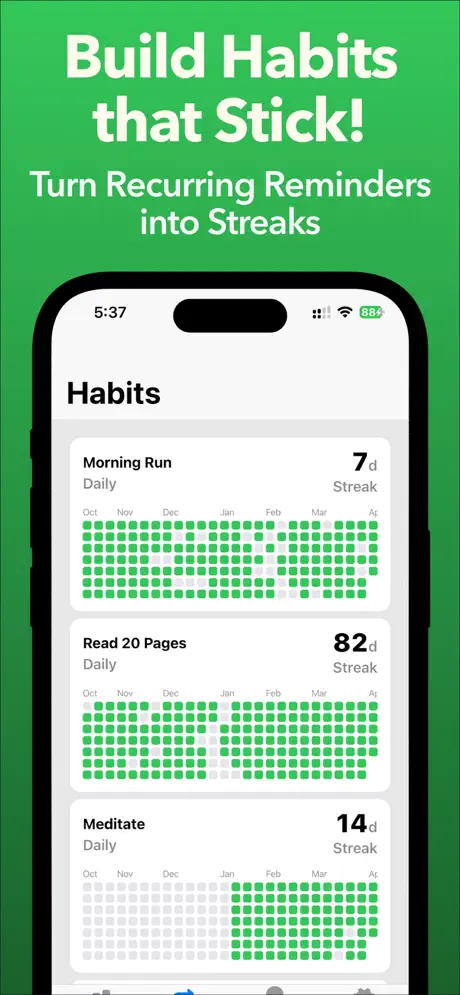
- Habits and streaksEvery repeating reminder becomes a habit automatically after its first completion, with current streak, best streak, total done and a monthly done/missed calendar. Hide or reorder habits; the first 2 are free.
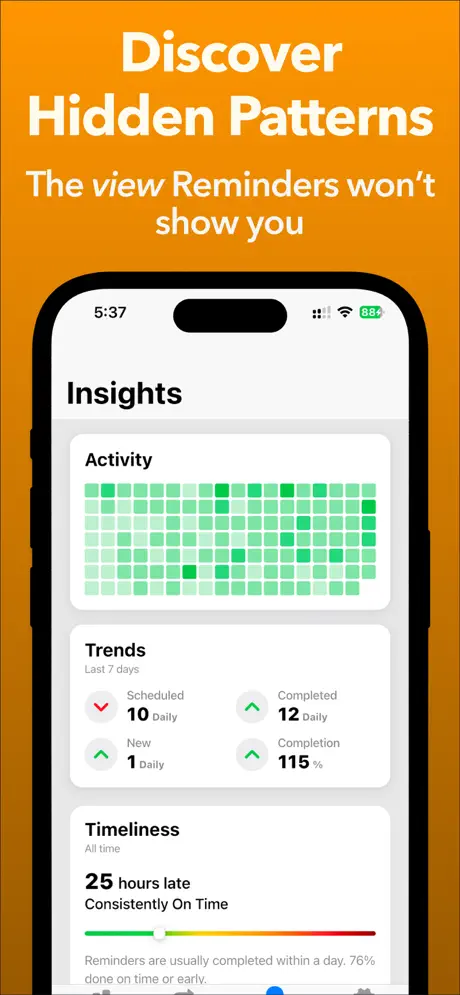
- Activity heatmapA GitHub-style contribution grid of every reminder you have completed, coloured by list, so busy weeks and quiet stretches are obvious at a glance. Pro shows the full history.
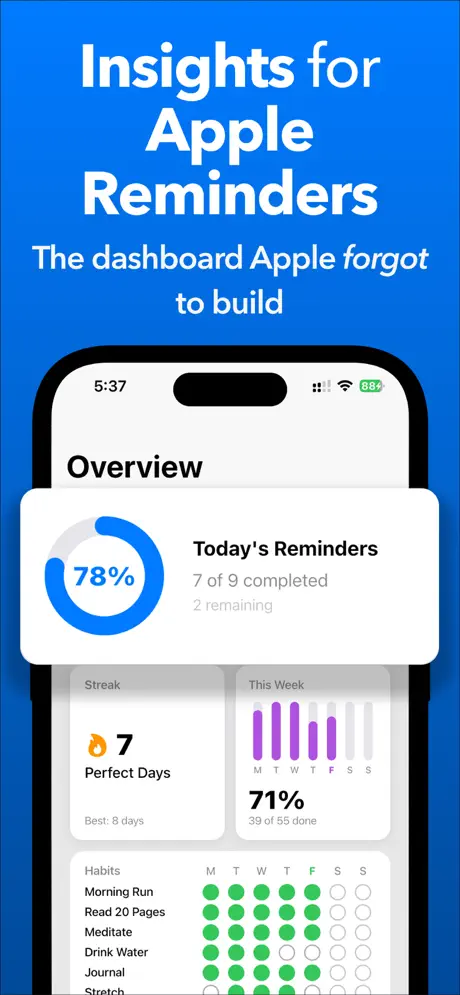
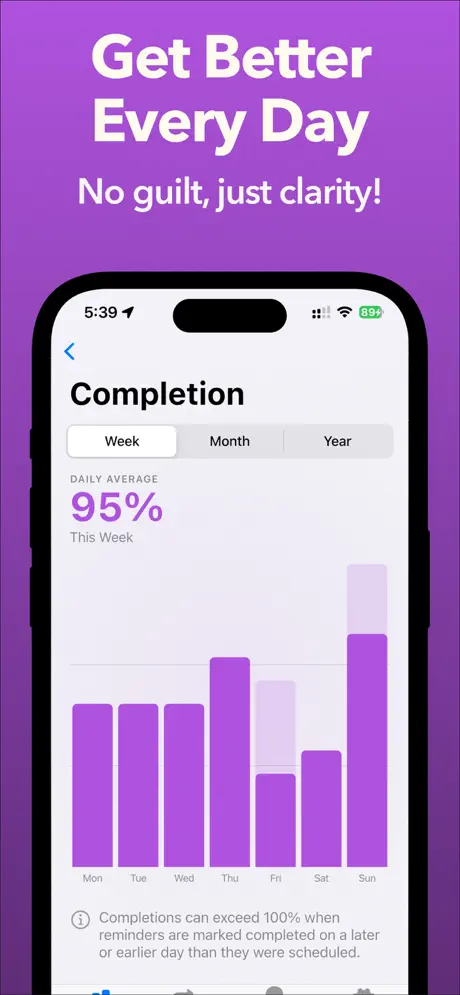
- Completion rate and trendsToday's ring (done / total), then week, month and year views with daily averages for scheduled, completed and newly created reminders, and whether each is rising or falling versus the previous period.
- Perfect Day streaksA run of consecutive days on which every scheduled reminder was completed the same day. Current, longest and (with Pro) every streak you have ever built.
- TimelinessDone within 24 hours of the due time counts as on time. See your recent, on-time and most-delayed completions, the average delay per list, and a one-line verdict from "Usually Early" to "Frequently Late".
- List insightsMost consistent, needs attention, busiest, most overdue, fastest and slowest follow-through — across all lists at once, plus a 30-day detail page per list. Exclude archived lists so they don't skew the numbers.
- Daily digestAn optional notification at a time you choose with what you completed today, what is due, what is overdue, and "This Day Last Year". Shareable as an image.
- Home and Lock Screen widgets6 Home Screen widgets and 9 Lock Screen widgets covering today's progress, the week, lists and habits (full list).
You can also check reminders off from ReminderStats' day view; the change is written back to Apple Reminders. Everything else is read-only.
How to track habits with Apple Reminders
Apple Reminders already supports repeating reminders; what it lacks is any record of how consistently you complete them. ReminderStats fills that gap in four steps, none of which change how you use Reminders.
- Create a repeating reminder in Apple RemindersOpen the Reminders app, add a reminder such as Drink water or Evening walk, and set Repeat to daily, weekdays, weekly or a custom interval. Reminders you create with Siri ("remind me every day at 9 to stretch") work the same way.
- Complete it once, in RemindersCheck the reminder off as you normally would. ReminderStats detects a repeating reminder as a habit after its first completion — there is nothing to configure in ReminderStats itself.
- Open the Habits tab in ReminderStatsEach habit shows its current streak, best streak, total completions and a done/missed calendar. Days you leave unchecked count as missed; hide habits you don't want to track and reorder the rest with Edit.
- Add a widgetPut Habits This Week or the Habit Tracker heatmap on the Home Screen, or Habit Dots on the Lock Screen, so the streak is visible without opening either app.
Why track habits in Apple Reminders instead of a separate habit app?
Because a dedicated habit tracker asks you to maintain two systems: do the habit, then open another app and log it. That second step is its own habit, with its own failure mode — you walk the 8,000 steps and forget to tap the button, the streak shows a gap, and the app gets uninstalled a few weeks later. If your habits already live in Reminders, checking one off is the same motion as dismissing any other reminder, and the tracking is a side effect of completing the task rather than extra work. ReminderStats only reads that history; it never asks you to log anything.
| Apple Reminders alone | Dedicated habit-tracker app | Reminders + ReminderStats | |
|---|---|---|---|
| Capture with Siri, Shortcuts, CarPlay, shared lists | Yes | Rarely | Yes (unchanged) |
| Streaks and consistency per habit | No | Yes | Yes |
| History and heatmap of completed tasks | No | Habits only | All reminders |
| Needs a second place to log each habit | — | Yes | No |
| Needs you to migrate existing tasks | — | Usually | No |
| Account or cloud sync required | iCloud | Often | No (uses iCloud via Reminders) |
| Pricing | Free | Often a subscription | Free; Pro is a one-time purchase |
Widgets for Apple Reminders
ReminderStats ships 15 widgets that put Reminders statistics on the Home Screen and Lock Screen — the numbers Apple's own Reminders widget doesn't show. Widgets require ReminderStats Pro.
Home Screen
- Overview — total, completed and pending reminders plus today's completion rate
- Today's Reminders — completed vs. total for today
- This Week — daily completion bars for the current week
- Lists This Week — completion per list for the week
- Habits This Week — each habit's done/missed status for every day of the week (small, medium and large)
- Habit Tracker — contribution-style heatmap for the habits you choose (hold to pick habits)
Lock Screen
- Today's Fraction — completed / total, circular
- Rate Ring — today's completion rate as a ring
- Dual Ring — this week's rate (outer) and today's rate (inner)
- Today's Progress — ring and count of completed reminders
- Weekly Bars — one bar per day for the current week
- Habits Progress — today's habit dots and count
- Habit Dots — nine-week dot matrix for a single habit
- Compact Summary — today's done/total and the week's rate in one line
- Habits Remaining — how many habits are still due today
Privacy: your reminders stay on your device
ReminderStats never uploads reminder content. With your permission it reads titles, due dates, lists and completion status from EventKit, computes every statistic locally, and keeps a private on-device cache so the app opens instantly. Revoke access at any time in Settings → Privacy & Security → Reminders; deleting the app deletes the cache.
Three third-party SDKs are used, none of which receive reminder data: Firebase Analytics (feature usage), Firebase Crashlytics (crash reports) and RevenueCat (verifying the Pro purchase with an anonymous ID). The App Store privacy label lists only identifiers and usage data, not linked to you. Details are in the Privacy Policy.
Pricing: free, with a one-time Pro purchase
- FreeToday's completion ring, this week's stats and trends, list overview, your first 2 habits with streaks, the daily digest, and checking reminders off from the day view.
- ReminderStats Pro — US $9.99 onceUnlimited habits, full history (past weeks, monthly and yearly views, all Perfect Day streaks and timed completions), all 15 widgets, timeliness insights and per-list analytics. No subscription, no recurring payments; restorable on any device with the same Apple Account.
Price shown for the United States storefront; local pricing is set by the App Store and may differ. A discounted lifetime offer is sometimes shown in the app.
What App Store reviewers say
ReminderStats is rated 5 out of 5 stars on the US App Store (4 ratings as of September 2026). Two of the written reviews:
⭐⭐⭐⭐⭐ Simple and clean
“This is exactly what I've been looking for to keep track of how consistent I am with my habits/routines I have set up in the reminders app. Highly recommend!”
⭐⭐⭐⭐⭐ Great app
“This is a great app, and it helps me with seeing what I've completed throughout the day/week.”
Frequently asked questions
What is ReminderStats?
ReminderStats is an iPhone and iPad app that adds habit tracking and statistics to Apple Reminders. It reads your reminders through Apple's EventKit framework and shows what the Reminders app doesn't: which repeating reminders you actually keep up with (habits and streaks), how much of what you schedule you complete, how late you tend to be, and which lists you neglect. It is a companion, not a replacement — you keep adding and checking off reminders with Siri, widgets, shared lists and Shortcuts, and ReminderStats turns that history into charts.
Does ReminderStats work with the built-in Apple Reminders app?
Yes — that is the only thing it works with. ReminderStats reads the same iCloud-synced reminders the Reminders app shows, including reminders added with Siri, Shortcuts, the Action button, CarPlay or shared family lists. Nothing has to be imported or re-entered.
Do I need an account?
No. There is no sign-up, login or cloud sync. The app asks for Reminders permission on first launch and everything else happens on the device.
How does ReminderStats turn reminders into habits?
Any reminder with a repeat rule (daily, every weekday, weekly, monthly, every N days and so on) is treated as a habit once you have completed it at least once. From then on ReminderStats tracks the current streak, best streak, total completions and a monthly done/missed calendar for it. You can hide habits you don't care about and reorder the rest from the Habits tab.
How do I skip a habit for a day?
Leave the reminder unchecked in Apple Reminders. There is no separate "skip" state: an occurrence that is not completed is recorded as missed, and the streak starts again from the next completion.
Can I exclude old or archived lists from the statistics?
Yes. Settings → Manage Lists lets you exclude any list; excluded lists disappear from all stats, habits and trends. This is the fix if a 2024 archive list is dragging your completion rate down.
What counts as completing a reminder on time?
A reminder completed within 24 hours of its due time counts as on time. Earlier is "early", later is "late", and the Timeliness screen groups your recent, on-time and most-delayed completions and summarises the pattern (for example "Usually Early" or "Frequently Late").
What is a Perfect Day streak?
A Perfect Day is a day on which every reminder scheduled for that day was completed the same day. A Perfect Day streak is a run of consecutive Perfect Days; ReminderStats shows your current and longest run and, with Pro, the full history.
Why can the completion rate be above 100%?
Because completions are counted on the day you complete them, not the day they were due. Clearing overdue reminders, or finishing tomorrow's reminders today, can push a day past 100%.
Why doesn't my recurring reminder show up as a habit?
Three things to check: the reminder must have a repeat rule set in Apple Reminders; it must have been completed at least once; and its list must not be excluded in Settings → Manage Lists. If it was hidden earlier, tap Edit on the Habits tab to show it again.
Does ReminderStats upload my reminders anywhere?
No. Reminder titles, due dates, lists and completion history are read on the device, cached locally so the app opens quickly, and never sent to a server. The app uses Firebase Analytics and Crashlytics for anonymous usage and crash reports, and RevenueCat to verify the Pro purchase with an anonymous identifier — none of these receive reminder content.
How much does ReminderStats cost? Is it a subscription?
ReminderStats is free to download, and the free version already shows today's progress, this week's stats and your first two habits. ReminderStats Pro is a one-time purchase (US $9.99 in the United States; prices vary by country) with no subscription or recurring payments.
What does ReminderStats Pro unlock?
Unlimited habits, full history (past weeks, monthly and yearly views, every Perfect Day streak and every timed completion), all home-screen and lock-screen widgets, timeliness insights and per-list analytics. Purchases are handled by the App Store and can be restored on any device signed in with the same Apple Account.
Does it work with Todoist, Things, TickTick or Google Tasks?
No. ReminderStats reads Apple Reminders only (via EventKit). If another app syncs its tasks into Apple Reminders, those reminders are included like any other.
Is there a Mac, Apple Watch or Android version?
ReminderStats is an iPhone and iPad app requiring iOS 15.6 or later. There is no dedicated Mac or Apple Watch app yet, and an Android version is not possible because Apple Reminders data only exists on Apple devices.
Which languages is the app available in?
11 languages: English, Arabic, Chinese (Simplified), French, German, Italian, Japanese, Korean, Portuguese, Russian, Spanish. The app follows the device language.
Latest update
Version 1.3.2 (): more reliable detection of repeating reminders as habits, "This Day Last Year" added to the Daily Digest, and assorted fixes from feedback sent by email and on Reddit. First released on .
About the developer
ReminderStats is built and maintained by Utsav Mangla, an independent iOS developer, who wrote it after years of running his own habits through Apple Reminders and having no way to see how consistent he was. He also makes Blog Manager, a client for Google Blogger, and XML Viewer & XML Editor. Feedback and bug reports go straight to him at support@umango.in.